

| :::{default-domain} bzl | |
| ::: | |
| # How to integrate a debugger | |
| This guide explains how to integrate a debugger | |
| with your Python applications built with `rules_python`. | |
| There are two ways available: the {obj}`--debugger` flag, and the {any}`RULES_PYTHON_ADDITIONAL_INTERPRETER_ARGS` environment variable. | |
| ## {obj}`--debugger` flag | |
| ### Basic Usage | |
| The {obj}`--debugger` flag allows you to inject an extra dependency into `py_test` | |
| and `py_binary` targets so that they have a custom debugger available at | |
| runtime. The flag is roughly equivalent to manually adding it to `deps` of | |
| the target under test. | |
| To use the debugger, you typically provide the `--debugger` flag to your `bazel run` command. | |
| Example command line: | |
| ```bash | |
| bazel run --@rules_python//python/config_settings:debugger=@pypi//pudb \ | |
| //path/to:my_python_binary | |
| ``` | |
| This will launch the Python program with the `@pypi//pudb` dependency added. | |
| The exact behavior (e.g., waiting for attachment, breaking at the first line) | |
| depends on the specific debugger and its configuration. | |
| :::{note} | |
| The specified target must be in the requirements.txt file used with | |
| `pip.parse()` to make it available to Bazel. | |
| ::: | |
| ### Python `PYTHONBREAKPOINT` Environment Variable | |
| For more fine-grained control over debugging, especially for programmatic breakpoints, | |
| you can leverage the Python built-in `breakpoint()` function and the | |
| `PYTHONBREAKPOINT` environment variable. | |
| The `breakpoint()` built-in function, available since Python 3.7, | |
| can be called anywhere in your code to invoke a debugger. The `PYTHONBREAKPOINT` | |
| environment variable can be set to specify which debugger to use. | |
| For example, to use `pdb` (the Python Debugger) when `breakpoint()` is called: | |
| ```bash | |
| PYTHONBREAKPOINT=pudb.set_trace bazel run \ | |
| --@rules_python//python/config_settings:debugger=@pypi//pudb \ | |
| //path/to:my_python_binary | |
| ``` | |
| For more details on `PYTHONBREAKPOINT`, refer to the [Python documentation](https://docs.python.org/3/library/functions.html#breakpoint). | |
| ### Setting a default debugger | |
| By adding settings to your user or project `.bazelrc` files, you can have | |
| these settings automatically added to your bazel invocations. e.g. | |
| ``` | |
| common --@rules_python//python/config_settings:debugger=@pypi//pudb | |
| common --test_env=PYTHONBREAKPOINT=pudb.set_trace | |
| ``` | |
| Note that `--test_env` isn't strictly necessary. The `py_test` and `py_binary` | |
| rules will respect the `PYTHONBREAKPOINT` environment variable in your shell. | |
| ## debugpy (e.g. vscode) | |
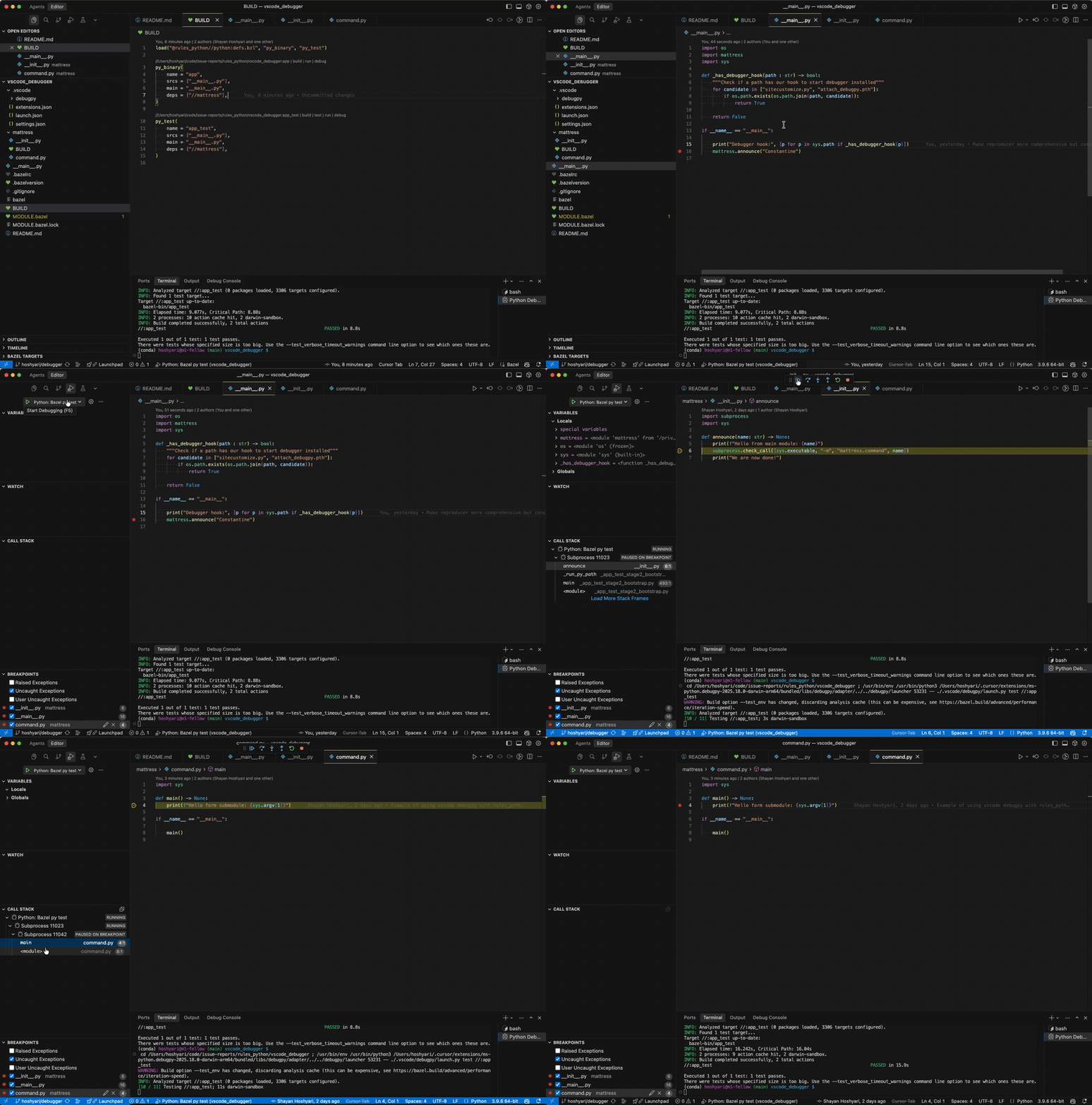
| You can integrate `debugpy` (i.e. the debugger used in vscode or PyCharm) by using a launcher script. This method leverages {any}`RULES_PYTHON_ADDITIONAL_INTERPRETER_ARGS` to inject the debugger into the Bazel-managed Python process. | |
| For the remainder of this document, we assume you are using vscode. | |
|  | |
| 1. **Create a launcher script**: Save the following Python script as `.vscode/debugpy/launch.py` (or another location, adjusting `launch.json` accordingly). This script bridges VS Code's debugger with Bazel. | |
| <details> | |
| <summary><code>launch.py</code></summary> | |
| ```python | |
| """ | |
| Launcher script for VS Code (debugpy). | |
| This script is not managed by Bazel; it is invoked by VS Code's launch.json to | |
| wrap the Bazel command, injecting the debugger into the runtime environment. | |
| """ | |
| import argparse | |
| import os | |
| import shlex | |
| import subprocess | |
| import sys | |
| from typing import cast | |
| def main() -> None: | |
| parser = argparse.ArgumentParser(description="Launch bazel debugpy with test or run.") | |
| parser.add_argument("mode", choices=["test", "run"], help="Choose whether to run a bazel test or run.") | |
| parser.add_argument("args", help="The bazel target to test or run (e.g., //foo:bar) and any additional args") | |
| args = parser.parse_args() | |
| # Import debugpy, provided by VS Code | |
| try: | |
| # debugpy._vendored is needed for force_pydevd to perform path manipulation. | |
| import debugpy._vendored | |
| # pydev_monkey patches os and subprocess functions to handle new launched processes. | |
| from _pydev_bundle import pydev_monkey | |
| except ImportError as exc: | |
| print(f"Error: This script must be run via VS Code's debug adapter. Details: {exc}") | |
| sys.exit(-1) | |
| # Prepare arguments for the monkey-patched process. | |
| # is_exec=False ensures we don't replace the current process immediately. | |
| patched_args = cast(list[str], pydev_monkey.patch_args(["python", "dummy.py"], is_exec=False)) | |
| pydev_monkey.send_process_created_message() | |
| # Extract the injected arguments (skipping the dummy python executable and script). | |
| # These args invoke the pydevd entrypoint which connects back to the debugger. | |
| rules_python_interpreter_args = " ".join(patched_args[1:-1]) | |
| bzl_args = shlex.split(args.args) | |
| if not bzl_args: | |
| print("Error: At least one argument (the target) is required.") | |
| sys.exit(-1) | |
| cmd = [ | |
| "bazel", | |
| args.mode, | |
| # Propagate environment variables to the test/run environment. | |
| "--test_env=PYDEVD_RESOLVE_SYMLINKS", | |
| "--test_env=RULES_PYTHON_ADDITIONAL_INTERPRETER_ARGS", | |
| "--test_env=IDE_PROJECT_ROOTS", | |
| bzl_args[0], | |
| ] | |
| if bzl_args[1:]: | |
| if args.mode == "run": | |
| # Append extra arguments for 'run' mode. | |
| cmd.append("--") | |
| cmd.extend(bzl_args[1:]) | |
| elif args.mode == "test": | |
| # Append extra arguments for 'test' mode. | |
| cmd.extend([f"--test_arg={arg}" for arg in bzl_args[1:]]) | |
| env = { | |
| **os.environ.copy(), | |
| # Inject the debugger arguments into the rules_python toolchain. | |
| "RULES_PYTHON_ADDITIONAL_INTERPRETER_ARGS": rules_python_interpreter_args, | |
| # Ensure breakpoints hit the original source files, not Bazel's symlinks. | |
| "PYDEVD_RESOLVE_SYMLINKS": "1", | |
| } | |
| # Execute Bazel. | |
| result = subprocess.run(cmd, env=env, check=False) | |
| sys.exit(result.returncode) | |
| if __name__ == "__main__": | |
| main() | |
| ``` | |
| </details> | |
| 2. **Configure `launch.json`**: Add the following configurations to your `.vscode/launch.json`. This tells VS Code to use the launcher script. | |
| <details> | |
| <summary><code>launch.json</code></summary> | |
| ```json | |
| { | |
| "version": "0.2.0", | |
| "configurations": [ | |
| { | |
| "name": "Python: Bazel py run", | |
| "type": "debugpy", | |
| "request": "launch", | |
| "program": "${workspaceFolder}/.vscode/debugpy/launch.py", | |
| "args": ["run", "${input:BazelArgs}"], | |
| "console": "integratedTerminal" | |
| }, | |
| { | |
| "name": "Python: Bazel py test", | |
| "type": "debugpy", | |
| "request": "launch", | |
| "program": "${workspaceFolder}/.vscode/debugpy/launch.py", | |
| "args": ["test", "${input:BazelArgs}"], | |
| "console": "integratedTerminal" | |
| } | |
| ], | |
| "inputs": [ | |
| { | |
| "id": "BazelArgs", | |
| "type": "promptString", | |
| "description": "Bazel target and arguments (e.g., //foo:bar --my-arg)" | |
| } | |
| ] | |
| } | |
| ``` | |
| </details> | |
| Note: If you find `justMyCode` behavior is incompatible with Bazel's symlinks (causing breakpoints to be missed), you can set `"justMyCode": false` in `launch.json` and use the `IDE_PROJECT_ROOTS` environment variable (set to `"${workspaceFolder}"`) to explicitly map your workspace. | |